Going faceless on TikTok Live lets you build an audience while keeping your identity private or your energy behind the scenes. Many creators start faceless for privacy, comfort, or because their content is naturally visual rather than personality driven.
TikTok’s Live program does not require a visible face to go live or to qualify for gifts and monetization. What actually keeps viewers watching is consistent audio, a clear visual anchor, and something happening on screen every few seconds.
Faceless Lives also lower the bar to start. You do not need lighting, makeup, or a set. A steady phone mount, a quiet room, and one of the formats below is enough for a first stream.
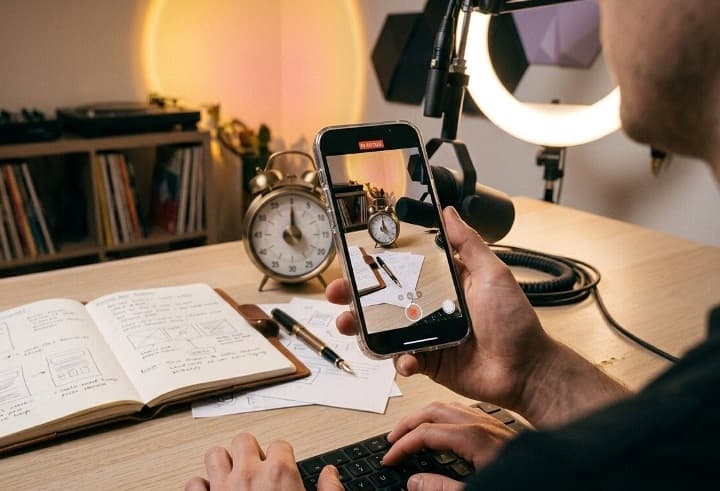
Screen Share and Digital Content Formats
These formats work well if you spend a lot of time at a computer or on your phone doing something viewers find useful or entertaining.
1. Gaming Commentary With Camera Off
Stream gameplay footage with your commentary running underneath. Viewers see the game, not you, while your voice carries the personality of the stream.
This works for mobile games, PC titles, or console play captured through a capture card.
2. Coding or Building in Public
Share your screen while writing code, building a spreadsheet, or designing in Figma.
Narrate your decisions as you go. This format draws a specific but loyal audience of learners who want to watch real work happen.
3. Study With Me Sessions
Point the camera at your desk, notes, and timer instead of your face. Add a countdown clock on screen and soft background sound.
These streams often run for one or two hours and attract viewers who want body doubling while they study.
4. Online Shopping or Deal Hunting Live
Share your screen while you browse deals, compare prices, or build a cart on a shopping site.
Talk through why you pick one item over another. This format suits comparison shopping, thrift flipping research, or travel deal hunting.
5. Reacting to Comments or News With a Blank Screen Overlay
Use a simple background graphic or slideshow while you read and respond to comments, trending topics, or questions submitted before the stream.
The visual anchor is the text on screen, not your face.
Pet and Animal Streams
Animal content performs consistently well on TikTok because viewers stay for the animal, not the host.
6. A Day in the Life of Your Pet
Follow your pet through feeding, play, and nap time with your voice narrating in the background.
Keep the camera on the animal at all times.
7. Aquarium or Fish Tank Live
Point the camera at a fish tank, add gentle music, and narrate feeding times or tank maintenance occasionally.
This format also works well as ambient background content that runs for long stretches.
8. Training Session With a Dog or Cat
Stream a training session from behind the pet’s eye line so viewers watch the animal respond to commands.
Your voice giving instructions is the only audio needed.
9. Wildlife or Bird Feeder Watch
Set up near a window or backyard feeder and let the camera capture birds or backyard wildlife.
This is one of the easiest formats to run passively for hours.
Art, Craft, and Hands Only Content
Hands only content is one of the strongest faceless categories because the viewer’s attention naturally follows the work, not a face.
10. Drawing or Painting Time Lapse Live
Point the camera down at your paper or canvas and narrate your process. Viewers watch the piece develop in real time, which creates natural suspense.
11. Calligraphy or Handwriting Live
Stream close up shots of pen strokes forming letters or bullet journal spreads. Add soft music and keep narration minimal so the visual rhythm carries the stream.
12. Baking or Cooking From an Overhead Angle
Mount your phone above a cutting board or countertop and cook a full recipe live. Overhead shots keep the focus on ingredients and technique instead of your face.
13. Knitting, Crochet, or Sewing Live
Show your hands working through a pattern while you talk through stitch counts or fabric choices.
This format attracts a dedicated niche audience that often stays for the full stream.
14. Miniature Painting or Model Building
Point the camera at a workbench covered in miniatures, paints, and tools. Narrate technique choices like brush size or paint thinning ratios as you work.
Voiceover and ASMR Formats
These formats depend entirely on sound design and require no visual of you at all.
15. ASMR Tapping, Crinkling, or Unboxing
Set up a microphone near objects you tap, crinkle, or unbox. Camera stays on the objects and hands, never the face.
Clear audio quality matters more than any other factor here.
16. Voiceover Storytelling With Slideshow Visuals
Read reddit style stories, folklore, or listener submitted stories aloud over a slideshow of relevant images or a moving background loop.
This format is popular in true crime and relationship advice niches.
17. Sleep or Relaxation Sounds Live
Stream ambient sounds such as rain, white noise, or a crackling fire with a static or slowly moving visual.
These streams often run overnight and attract viewers looking for background sound while they sleep.
18. Whisper Reading or Book Narration
Read from a book, poem collection, or fan fiction in a soft voice over a still shot of the book cover or a calm background. This crosses over well with the ASMR audience.
Music and Performance Without a Face Cam
Music streams work well without a face cam because the instrument or the sound itself holds attention.
Point the camera at your hands, your setup, or your gear instead of your face, and let the performance carry the stream.
19. Instrument Practice or Performance
Point the camera at your hands on a piano, guitar, or other instrument instead of your face. Viewers who play the same instrument often stay to watch technique.
20. DJ Set or Music Production Session
Stream your DJ deck, mixer, or production software as you build a set or a track from scratch.
Narrate your choices occasionally between songs to keep viewers engaged during quiet stretches.
Conclusion
Faceless TikTok Live works best when you pick a format that fits what you already do well, whether that is gaming, cooking, drawing, or simply owning a curious cat.
Start with one format from this list, run a short test stream, and adjust framing and audio based on what keeps viewers watching past the first few minutes.